

Create Videos in Minutes with Easy Free AI Video Editors for Beginners
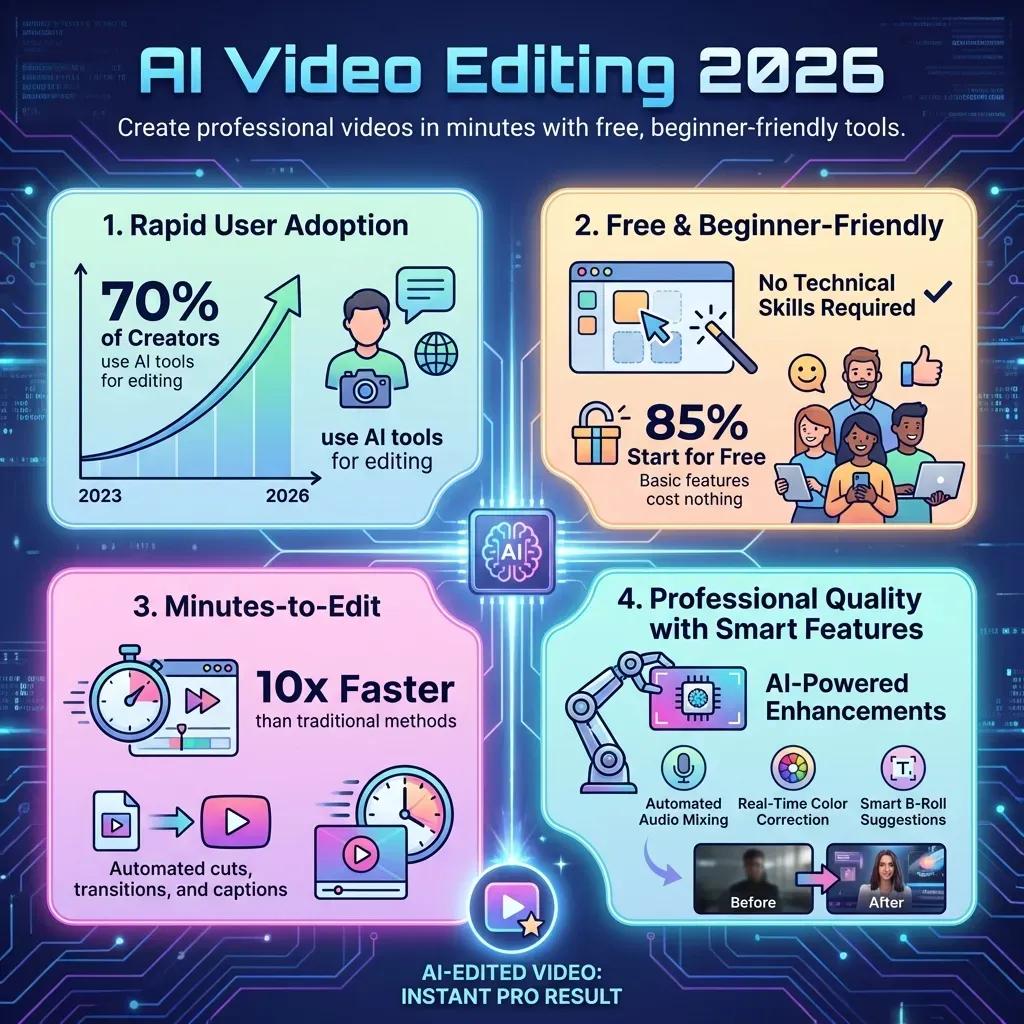 Ever dreamt of creating captivating videos but felt overwhelmed by complex software and steep learning curves? You're not alone. Many aspiring creators get stuck, believing professional-quality video production requires advanced skills and expensive tools, but that's about to change.
Introducing a new era where powerful, easy free AI video editor like CapCut, free AI dance video editor, easy free AI video editor tools are at your fingertips. These innovative solutions are designed specifically for beginners, transforming the daunting task of video editing into an accessible and enjoyable experience.
This guide will unveil the top AI-powered video editors of 2026, revealing how they simplify editing, enhance your creativity, and empower you to produce stunning content effortlessly. Get ready to unlock your video-making potential and share your stories with the world in minutes, not hours.
Top 5 Best Free AI Video Editors for Beginners in 2026
Navigating the world of video editing can be daunting, but AI is democratizing the process. In 2026, several free AI video editors offer intuitive interfaces and powerful features, making professional-looking videos accessible to everyone. These tools eliminate the steep learning curve, allowing beginners to focus on creativity. Discover the top five that simplify video creation.
AuraClip
AuraClip acts as your personal AI video editing agent. It transforms raw footage into polished videos using simple chat commands. The tool automatically removes silence, adds captions, and inserts background music and smart transitions. AuraClip supports multi-round revisions without requiring any editing skills. This makes it an ideal content creation tool for YouTubers, vloggers, and modern creators seeking a zero-learning-curve solution. It handles tasks like AI automatic editing and natural language video editing efficiently.
Canva Magic Media
Canva's Magic Media suite provides a user-friendly interface for beginners. Leverage AI to generate video clips and utilize text-to-video capabilities. A vast library of templates and stock assets is available. This integrated solution within the broader Canva ecosystem simplifies incorporating AI-generated visuals into existing designs. It’s an easy free AI video editor that enhances visual storytelling for social media and presentations.
Kapwing
Kapwing is a web-based editor simplifying complex editing tasks with AI-powered tools. It offers automatic subtitling, background removal, and smart trimming. These features are accessible through an intuitive drag-and-drop interface. Kapwing is perfect for social media content and quick edits. It serves as a free AI video editor like CapCut, offering similar ease of use for rapid content production.
Pictory
Pictory excels at transforming long-form content into short, shareable video clips. Its AI analyzes content like blog posts or webinars to identify key moments. It automatically generates videos with relevant visuals and voiceovers. This capability is ideal for content repurposing. Pictory offers an easy free AI video editor experience for marketers and content managers.
InVideo
InVideo provides a robust platform with AI assistance for quick, professional video creation. It features a wide range of templates and an extensive media library. AI-driven tools handle tasks like voiceover generation and scene creation. InVideo caters to creators needing polished output with minimal effort. It stands out as an easy free AI video editor for marketing and promotional videos.
These five platforms represent the forefront of accessible AI video editing, empowering beginners to produce high-quality content with unprecedented ease.
1. AuraClip
AuraClip's AI-powered chat interface allows users to edit videos using natural language commands, eliminating the need for traditional editing skills. It automates time-consuming tasks like silence removal and captioning, making it exceptionally efficient for content creators.
Experiment with Chat Commands: Don't hesitate to try different phrasing for your editing requests. The more you interact, the better you'll understand AuraClip's capabilities.
Leverage Multi-Round Revisions: Use the multi-round revision feature to fine-tune your video. You can request specific changes iteratively without starting over.
2. Canva Magic Media
Canva Magic Media integrates AI video generation and text-to-video features directly into the familiar Canva design environment. This allows for seamless creation and incorporation of AI-generated visuals into existing projects, ideal for social media and presentations.
Combine with Templates: Use Magic Media to generate unique video elements and then integrate them into Canva's vast library of templates for a professional look.
Explore Text-to-Video: Input descriptive text prompts to generate short video clips that can be used as B-roll or standalone visuals for your content.
3. Kapwing
Kapwing is a web-based editor that simplifies video editing with AI tools like automatic subtitling and background removal, accessible via a drag-and-drop interface. It's well-suited for rapid social media content creation and quick edits, positioning it as a free AI video editor like CapCut.
Utilize Smart Trimming: For fast-paced social media content, use Kapwing's smart trimming to quickly remove unnecessary parts of your video.
Add Auto-Captions: Leverage the automatic subtitling feature to make your videos more accessible and engaging for viewers who watch with sound off.
4. Pictory
Pictory specializes in transforming long-form content (like blog posts or webinars) into short, shareable video clips. Its AI identifies key moments and automatically generates videos with relevant visuals and voiceovers, making it excellent for content repurposing.
Repurpose Blog Content: Input your blog post URLs into Pictory to automatically generate video summaries or highlight reels.
Create Social Snippets: Use Pictory to extract engaging segments from longer videos (like webinars or interviews) for social media promotion.
5. InVideo
InVideo offers a comprehensive platform with AI assistance for creating professional videos quickly. It boasts numerous templates, a large media library, and AI tools for voiceover generation and scene creation, catering to those who need polished output with minimal effort.
Explore AI Voiceovers: Use InVideo's AI voiceover feature to add narration to your videos without needing to record your own voice.
Browse Templates for Inspiration: Even if you have specific ideas, browsing InVideo's extensive template library can spark creativity and guide your editing process.
Choosing the Right Free AI Video Editor for Your Needs in 2026
Navigating the landscape of free AI video editors in 2026 requires a strategic approach. With numerous tools emerging, understanding their capabilities and limitations is crucial for efficient content creation. This guide helps you select the best option for your specific needs.
Ease of Use for Absolute Beginners
For those new to video editing, a user-friendly interface is paramount. Tools like AuraClip offer a conversational approach, allowing you to transform footage with simple chat commands, eliminating the need for prior editing knowledge. Similarly, platforms such as Canva and Kapwing provide intuitive drag-and-drop systems, making them excellent choices for absolute beginners seeking an easy free AI video editor.
Key AI Features to Look For
When evaluating free AI video editors, prioritize core AI functionalities. Essential features include automatic captioning and silence removal, which significantly speed up post-production. Smart transitions and text-to-video generation capabilities are also valuable. AuraClip’s ability to handle multi-round revisions via chat commands and its AI-powered content analysis tools offer a professional edge without complex editing skills, making it comparable to what users might seek in a free AI video editor like Capcut.
Content Specialization: Social Media vs. Long-Form
Your content goals will dictate the ideal editor. For short, engaging social media clips, platforms like Kapwing and Canva excel with their template-driven approaches and quick export options. If your aim is to repurpose longer content into highlights or create promotional snippets, tools such as Pictory and InVideo are strong contenders. AuraClip offers versatility, catering to both short-form social content and longer-form video editing needs effectively.
Integration and Workflow Compatibility
Consider how a free AI video editor fits into your existing workflow. Evaluate its integration capabilities with other tools you frequently use, such as cloud storage or social media platforms. A seamless workflow ensures efficiency. For instance, if you rely on specific stock footage libraries, check for direct integrations.
Limitations of Free Tiers
It's vital to understand the constraints of free tiers. Expect limitations such as watermarks on exported videos, caps on export resolution (e.g., 720p or 1080p), restricted access to premium AI features, and limited cloud storage. Knowing these limitations upfront helps manage expectations for 2026 and ensures you select a tool that aligns with your project scope.
| Feature | AuraClip (Free Tier) | Canva (Free Tier) | Kapwing (Free Tier) |
|---|---|---|---|
| Watermark | No | Yes | Yes |
| Export Resolution | Up to 1080p | Up to 720p | Up to 720p |
| AI Captioning | Yes | Limited | Yes |
| Cloud Storage | Limited | Limited | Limited |
| Advanced AI | Basic | Basic | Basic |
FAQ (Frequently Asked Questions)
Q1: Are free AI video editors truly free?
A1: Many offer robust free tiers with core functionalities. However, expect limitations like watermarks, restricted advanced features, or lower export quality. Paid versions unlock full capabilities.
Q2: Can AI video editors replace human editors?
A2: AI editors are powerful assistants, automating tasks and speeding up processes. For complex creative direction and nuanced control, human editors remain essential in 2026.
Q3: What is the best AI video editor for YouTube beginners?
A3: AuraClip is excellent for its chat-based automation. Kapwing and Canva also offer user-friendly interfaces suitable for beginners, simplifying content production.
Q4: How do I remove silence from a video using AI?
A4: Most AI editors, including AuraClip and Kapwing, offer automatic silence removal. You typically enable this during import or editing, and the AI intelligently detects and removes silent sections.
Q5: Can AI generate video from text descriptions?
A5: Yes, tools like Pictory, InVideo, and Canva can create video clips from text prompts. They use stock footage and AI elements to build videos from your descriptions.
Conclusion
The era of complex video editing is over, with 2026 marking a revolution fueled by accessible AI tools. Free editors like AuraClip, Canva, Kapwing, Pictory, and InVideo now empower absolute beginners, proving that a free AI video editor like CapCut, a free AI dance video editor, or simply an easy free AI video editor can unlock professional-quality content creation with incredible speed and simplicity.
Your next step is clear: dive into the free versions of these powerful platforms and experiment with their core AI features. Explore what AuraClip, Canva, Kapwing, Pictory, and InVideo offer, and choose the one that best resonates with your creative vision and comfort level.
Don't wait any longer to bring your ideas to life; start creating your next viral video today! Embrace the power of these user-friendly tools and discover how easy and rewarding video creation can be, all without needing professional editing skills.