

How an AI Video Editor Empowers Your Creative Vision
 Ever felt overwhelmed by the complexities of video editing, wishing you could bring your vibrant ideas to life without spending hours wrestling with software? The dream of creating polished, engaging videos often clashes with the reality of steep learning curves and time-consuming processes.
This is where the power of an AI video editor truly shines, especially as we look ahead to 2026. These intelligent tools are no longer a futuristic concept but a present-day reality, designed to democratize content creation for everyone from aspiring YouTubers to seasoned vloggers.
This article will guide you through how an AI video editor can transform your workflow, streamline the editing process, and ultimately empower your unique creative vision. Discover how to unlock professional-quality results and elevate your content with ease.
Top 5 AI Video Editors to Revolutionize Your Content in 2026
In 2026, the landscape of content creation is being reshaped by advanced AI video editors. These tools transform raw footage into professional videos with unprecedented ease, empowering creators of all skill levels. This section explores five leading AI video editors that streamline the editing process, enhance engagement, and deliver polished results.
AuraClip: Your Personal AI Video Editing Agent
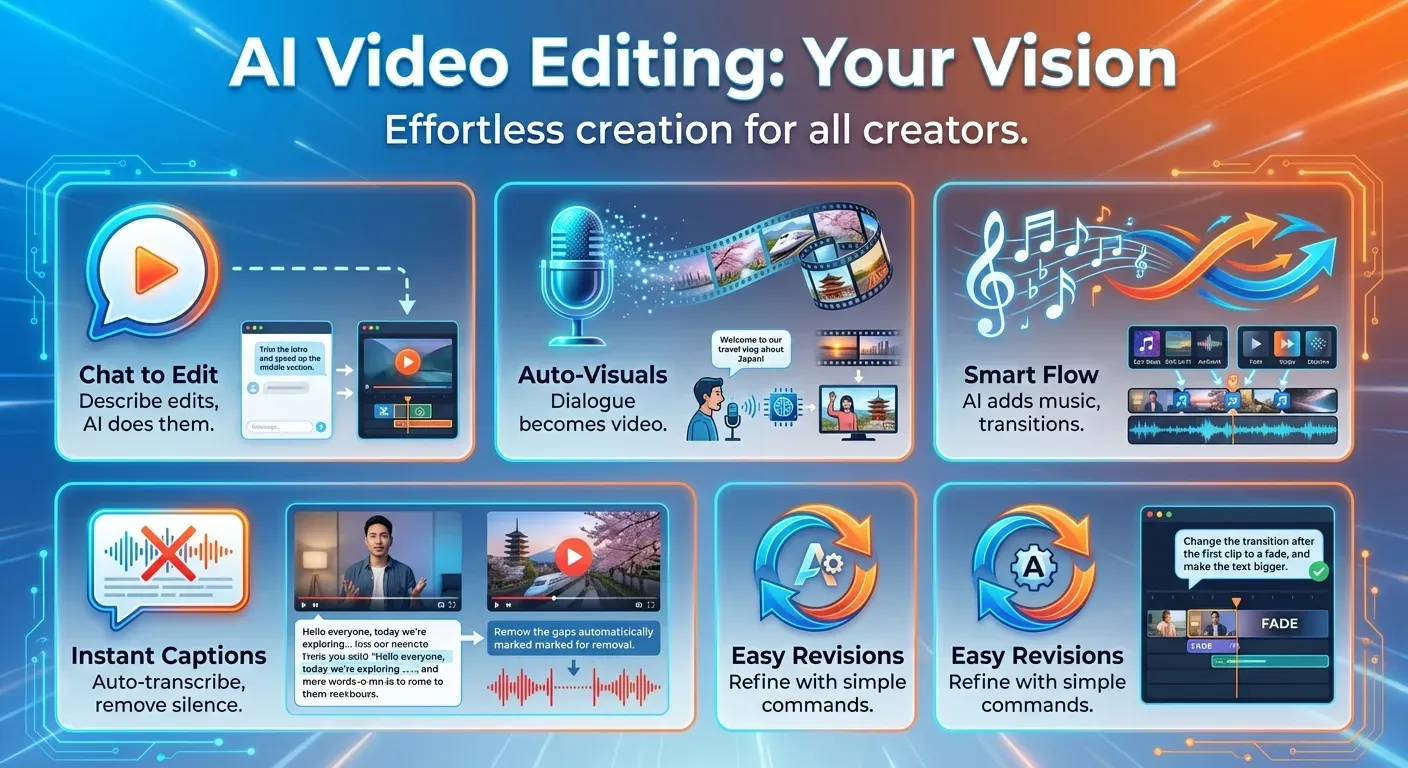
AuraClip acts as your personal AI video editing agent, designed to transform raw footage into professional videos through simple chat commands. It automatically removes silence, adds captions, and instantly inserts background music and smart transitions, making it the ultimate content creation tool for YouTubers, vloggers, and modern content creators in 2026. Its conversational interface and multi-round revision capabilities mean you don't need any prior editing skills to achieve polished results.
AI-Powered Dialogue-to-Video
Leverage AI to convert your spoken words into compelling video narratives. This feature understands your dialogue and automatically generates relevant visuals, B-roll, and scene cuts, ensuring your message is delivered effectively and engagingly to your audience in 2026. This capability significantly reduces the time spent searching for and integrating supplementary media, focusing on the core message.
Smart Transition & Music Insertion
Effortlessly enhance the flow and professionalism of your videos. AI video editors can intelligently analyze your footage and insert dynamic transitions and background music that perfectly match the mood and pacing of your content, all without manual intervention. This ensures a cohesive and engaging viewing experience, elevating the production value of your content.
Automated Captioning and Silence Removal
Save hours of tedious work with automatic caption generation and silence removal. AI accurately transcribes your audio into captions and intelligently trims out pauses and dead air, ensuring your videos are more concise, accessible, and engaging for viewers in 2026. This feature improves viewer retention and broadens accessibility for a wider audience.
Multi-Round Revisions for Flawless Edits
Iterate and refine your video projects with ease. AI video editors support multi-round revisions through simple commands, allowing you to make adjustments and improvements without needing to learn complex editing software, ensuring your final product perfectly aligns with your creative vision for 2026. This iterative process guarantees user satisfaction and creative control.
1. AuraClip: Your Personal AI Video Editing Agent
Practical Implications: AuraClip simplifies complex editing tasks into conversational commands, making professional video creation accessible to individuals without prior editing experience. This means you can quickly produce polished content by simply describing your desired edits.
Actionable Tips:
Experiment with chat commands: Don't hesitate to try different phrasing to see how AuraClip interprets your requests for silence removal, captioning, or music insertion.
Utilize multi-round revisions: If the initial output isn't perfect, use the revision feature to fine-tune the video until it matches your vision.
2. AI-Powered Dialogue-to-Video
Practical Implications: This feature transforms spoken content into visual narratives automatically, saving significant time on media sourcing and integration. It ensures your core message is supported by relevant visuals without manual effort.
Actionable Tips:
Focus on clear dialogue: Ensure your spoken words are clear and concise to help the AI accurately generate relevant visuals.
Review generated visuals: While AI is powerful, always review the automatically generated B-roll and scene cuts to ensure they perfectly align with your intended tone and message.
3. Smart Transition & Music Insertion
Practical Implications: AI intelligently analyzes your footage to add dynamic transitions and background music that enhance the video's mood and pacing. This elevates production value effortlessly.
Actionable Tips:
Provide context for mood: If possible, give the AI some context about the desired mood (e.g., "upbeat," "calm," "dramatic") to help it select the most appropriate music and transitions.
Trust the AI's analysis: Allow the AI to suggest transitions and music; you might be surprised by how well it matches your content.
4. Automated Captioning and Silence Removal
Practical Implications: This feature dramatically reduces post-production time by automatically transcribing audio and trimming out unnecessary pauses. This leads to more engaging and accessible videos.
Actionable Tips:
Speak clearly and at a consistent pace: This will improve the accuracy of the AI's transcription and silence detection.
Review captions for accuracy: While automated, it's always a good practice to quickly review generated captions for any minor errors.
5. Multi-Round Revisions for Flawless Edits
Practical Implications: The ability to make iterative changes through simple commands without complex software allows for precise control over the final product, ensuring it perfectly aligns with your creative vision.
Actionable Tips:
Break down revisions into steps: Instead of one large revision request, make smaller, specific requests for each change you want to implement.
Keep a record of your revision commands: This can be helpful for future projects or if you need to revert to a previous version.
The Evolution of Video Editing: AI's Role in 2026
The landscape of video editing has dramatically shifted by 2026. Complex, time-consuming manual processes have given way to intuitive, AI-driven workflows. An AI video editor is no longer a novelty but a necessity for creators who need efficiency and professional output. This evolution democratizes video production for everyone.
From Manual to Automated: A 2026 Perspective
In the past, video editing demanded technical skill with timelines, keyframes, and manual cuts. By 2026, this model is obsolete for most creators. AI agents now perform the heavy lifting. Editors simply provide raw footage and instructions. The AI handles the intricate assembly, turning a technical chore into a simple conversation.
| Aspect | Traditional Editing (Pre-2020s) | 2026 AI Editing |
|---|---|---|
| Interface | Complex timelines, panels, tools | Simple chat or text commands |
| Core Task | Manual cutting, syncing, color grading | Automated scene detection, silence removal |
| Required Skill | High technical proficiency | Creative direction and storytelling |
| Revision Process | Time-consuming manual adjustments | Multi-round conversational changes |
Key AI Features Driving Innovation
Natural language processing (NLP) is a cornerstone of the modern AI video editor. Platforms like AuraClip and InVideo AI allow users to edit with simple text commands. A creator can type "cut out the long pause at the beginning" or "add upbeat background music," and the AI executes the task instantly.
Intelligent content analysis powers further automation. These systems scan footage to automatically detect scenes, identify speakers, and remove silent segments. Advanced algorithms also generate realistic voiceovers from text and synchronize background music to the video's emotional tone, creating a polished final product without manual effort.
Impact on Content Creator Workflows
Content creators in 2026 experience unprecedented efficiency. AI handles repetitive tasks like splicing clips, generating captions, and adding standard effects. This automation reduces production time from hours or days to minutes. It frees creators from the technical details of the editing process.
This newfound time allows creators to focus on what matters most: storytelling, content strategy, and audience engagement. Instead of navigating complex software, they can produce more high-quality content, experiment with new ideas, and build stronger connections with their communities.
FAQ (Frequently Asked Questions)
Q1: What is an AI video editor?
A1: An AI video editor is a software tool leveraging artificial intelligence algorithms. These algorithms automate and streamline video production tasks like editing and captioning. This makes content creation more accessible for everyone.
Q2: Can AI video editors replace human editors?
A2: AI video editors efficiently handle many tasks but act as powerful assistants. They augment, rather than completely replace, human editors. Complex creative decisions and nuanced storytelling often require human oversight.
Q3: How does AI remove silence from videos?
A3: AI identifies silence by analyzing audio tracks for segments below a specific decibel threshold or lacking speech. The system then automatically trims or cuts these sections. This process creates more dynamic and concise videos.
Q4: Are AI video editors suitable for beginners?
A4: Yes, AI video editors are highly suitable for beginners in 2026. Their intuitive interfaces often use simple commands or automated processes. This significantly lowers the barrier to entry for creating professional-looking videos.
Q5: What are the benefits of using an AI video editor?
A5: Benefits include significant time savings and reduced costs. Users can increase their content output and improve video quality. AI video editors offer greater accessibility for those with limited editing skills.
Conclusion
As we stand on the cusp of 2026, AI video editors are revolutionizing the creative landscape, making professional-grade video production accessible to everyone. These powerful tools, exemplified by platforms like AuraClip, are democratizing creation, empowering individuals to bring their visions to life with unprecedented efficiency and ease.
To harness this transformative technology, actively explore the diverse features offered by AI video editing tools. Experiment with their capabilities and seamlessly integrate them into your existing workflow to significantly save time and elevate the quality of your video content. Embrace the future of filmmaking today.
Don't wait to unlock your creative potential; start crafting your next cinematic masterpiece with an AI video editor now. The tools are here, the possibilities are endless, and your audience is waiting for your next compelling story. Let AI be your guide to unparalleled video creation.