

Elevate Your Videos: Discover How to Add Text to a Video Creatively
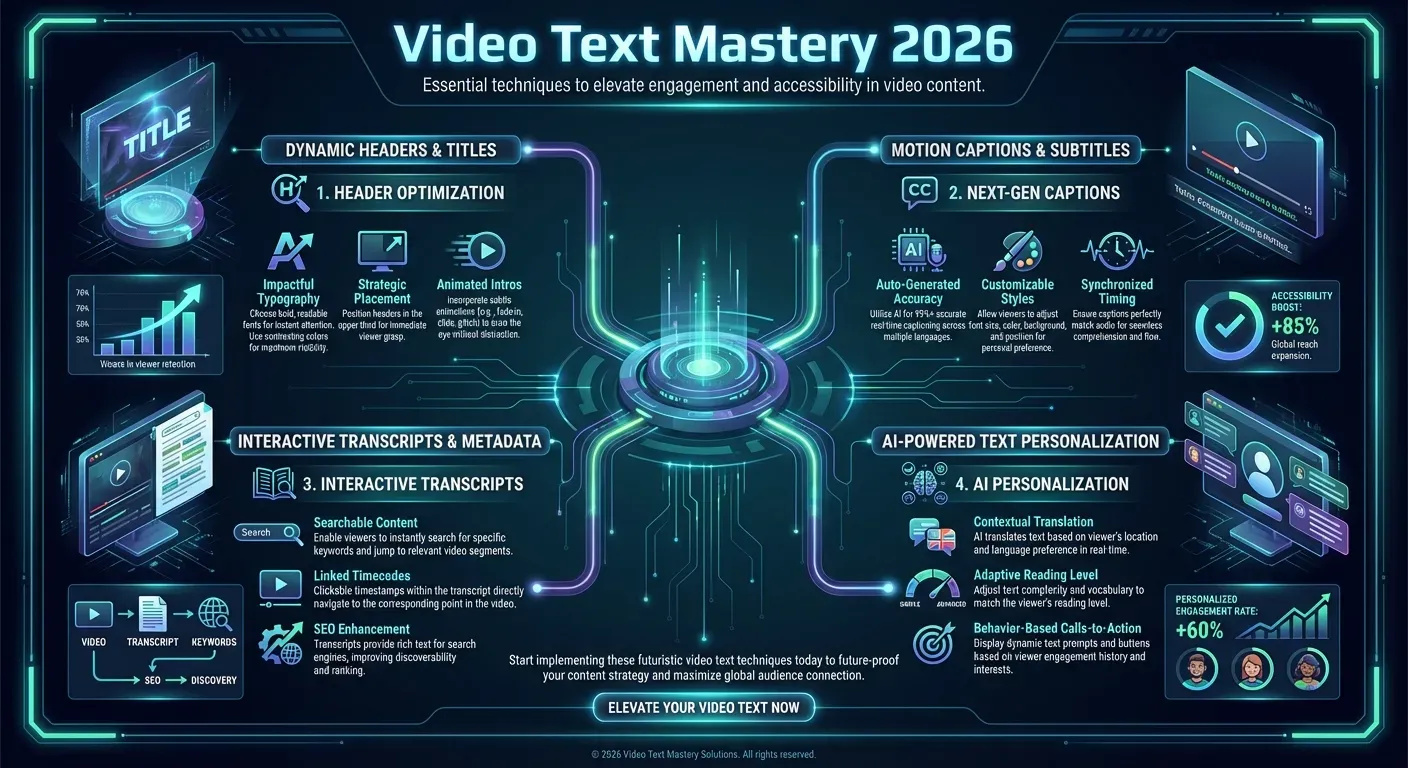 Tired of your videos falling flat, losing viewer attention before they even get to your core message? In today's fast-paced digital landscape, static visuals simply don't cut it anymore. You need to command attention and deliver information with impact.
Understanding how to add text to a video is no longer just a technical skill; it's a creative necessity for 2026. This article will unlock the secrets to transforming your footage into captivating narratives that viewers won't want to scroll past. We'll explore essential techniques, dive into inspiring creative applications, and introduce you to tools that make adding dynamic text overlays a breeze, ensuring your message is seen, understood, and remembered. Get ready to elevate your video content with style and clarity.
Top 10 Creative Ways to Add Text to Your Videos in 2026
Adding text transforms raw footage into engaging content. In 2026, text integration goes beyond simple captions, offering dynamic ways to connect with your audience and enhance understanding.
AuraClip: AI-Powered Text Overlays
AuraClip, your AI video editing agent, revolutionizes how you add text. Transform raw footage into professional videos with simple chat commands. It automatically adds captions and enables multi-round revisions without editing skills, making text integration seamless for YouTubers and vloggers.
Subtle Title Introductions
Begin your videos with a clear, concise title. This immediately sets the context and hooks viewers. Use elegant typography that matches your brand's aesthetic for a professional first impression in 2026.
Dynamic Lower Thirds
Introduce speakers, locations, or topics with clean, modern lower thirds. These overlays provide essential information without distracting from the main content. This is crucial for maintaining viewer focus.
Engaging Call-to-Actions (CTAs)
Guide your audience towards the next step with compelling call-to-action text. Whether it's 'Subscribe Now,' 'Learn More,' or 'Visit Our Website,' clear CTAs drive engagement and conversions.
Explainer Text for Complex Concepts
Break down complex information using text overlays. Highlight key points, definitions, or statistics. This visual reinforcement aids comprehension and retention for educational content.
Animated Quote Overlays
Bring impactful quotes to life with animated text. Choose fonts and animation styles that reflect the quote's tone. This adds a powerful emotional layer to testimonials or insights.
Subtitles and Captions
Enhance accessibility and viewer engagement with accurate subtitles and captions. This helps viewers with hearing impairments and those watching with sound off.
Location and Timestamp Markers
Provide context and clarity by indicating specific locations, dates, or times. This is useful for travel vlogs, documentaries, or news-style content.
Interactive Polls and Questions
Incorporate interactive text elements like questions or polls. This encourages audience participation, fosters community, and provides valuable feedback.
End Screen Text and Branding
Conclude your videos with clear end screen text. Reinforce your brand identity, encourage subscriptions, and direct viewers to other content. This maximizes video impact.
1. AuraClip: AI-Powered Text Overlays
AuraClip simplifies text integration with AI. It automatically adds captions and allows easy revisions via chat. This tool is ideal for content creators needing efficient, skill-free text overlays.
2. Subtle Title Introductions
A clear title at the start sets viewer expectations. Use typography that aligns with your brand. This creates a professional and engaging introduction to your video content.
3. Dynamic Lower Thirds
Lower thirds introduce key information like names or places. They are essential for clarity without obstructing the main visual. This technique keeps viewers informed and focused.
4. Engaging Call-to-Actions (CTAs)
Direct viewers with clear CTAs like "Subscribe" or "Visit Us." Effective CTAs encourage desired actions and increase engagement. Make them prominent and easy to understand.
5. Explainer Text for Complex Concepts
Use text to clarify difficult topics or highlight data. This visual aid improves comprehension and retention. It's a powerful tool for educational or informational videos.
6. Animated Quote Overlays
Animate quotes for added impact and emotion. The animation style should match the quote's tone. This makes testimonials or insights more memorable and engaging.
7. Subtitles and Captions
Subtitles and captions are vital for accessibility. They benefit viewers with hearing loss and those watching without sound. Accurate captions broaden your audience reach.
8. Location and Timestamp Markers
Add location or time details for context. This is particularly useful for travel vlogs or historical content. It helps viewers follow along with the narrative.
9. Interactive Polls and Questions
Engage your audience with on-screen questions or polls. This fosters interaction and community building. It also provides valuable viewer feedback.
10. End Screen Text and Branding
Reinforce your brand and guide viewers at the end. Include calls to subscribe or watch more videos. This maximizes your video's lasting impact.
Creative Text Application Techniques for 2026 Videos
Adding text to videos is crucial for engagement and clarity in 2026. Understanding how to add text to a video effectively involves thoughtful font selection, strategic animation, and precise placement. This guide outlines key techniques for impactful text integration.
Choosing the Right Font
Selecting fonts that align with your video's tone and brand is paramount. For on-screen text in 2026, sans-serif fonts generally offer superior readability. They present clean lines, making them easy to scan on various devices. Serif fonts, with their decorative strokes, can add a touch of elegance. Use them judiciously for specific applications, like title cards or branding elements where a more formal aesthetic is desired.
Mastering Text Animation
Utilize text animations sparingly and purposefully. Overuse can detract from your core message. Subtle animations like fades, slides, or typewriter effects can enhance engagement by drawing attention. These techniques guide the viewer's eye without becoming a distraction. Avoid overly flashy or rapid animations that can overwhelm the audience in 2026.
Color Contrast and Readability
Ensure sufficient contrast between your text and the video background. This is vital for maximum readability, especially on smaller screens. White or light text on dark backgrounds, or vice versa, typically provides the best visibility. Consider using a subtle outline or shadow for text if contrast is challenging, ensuring it remains readable across diverse video content.
Timing and Placement Strategy
Strategically place text to avoid obstructing key visual elements. Text should complement, not compete with, your footage. Time text appearances to coincide with spoken words or relevant on-screen actions. This synchronization reinforces the message and enhances clarity. Precise timing ensures viewers can process the information effectively, maximizing the impact of your video content in 2026.
Tools like AuraClip, an AI video editing agent, simplify these processes. AuraClip automatically adds captions and can assist with text placement, transforming raw footage into professional videos through simple chat commands. This AI-powered approach streamlines the workflow for content creators.
Leveraging AI for Effortless Text Integration in 2026
In 2026, the complexity of adding text to videos is a thing of the past. AuraClip, your personal AI video editing agent, redefines content creation. It transforms raw footage into professional videos using simple chat commands. This approach bypasses traditional editing skills, making video production accessible to everyone.
Introducing AuraClip: Your AI Video Editing Agent
AuraClip acts as your dedicated AI assistant, streamlining the entire video editing workflow. It empowers creators to produce polished content from raw footage through intuitive conversational commands. This intelligent agent handles complex tasks, allowing users to focus on their message rather than technicalities.
AI-Powered Captioning
AuraClip's standout feature is its automatic, accurate caption generation. This capability significantly reduces the time and effort traditionally required for subtitling. Ensuring your videos are accessible and engaging for a wider audience is now effortless, catering to diverse viewing habits and accessibility needs.
Automated Text Insertion with Chat Commands
Adding text elements like captions, titles, or calls to action (CTAs) becomes as simple as typing a chat command. This zero-editing-skill approach democratizes video production. Creators of all levels can now efficiently produce professional-looking content, answering the question of how to add text to a video with unparalleled ease.
AuraClip's conversational interface and automated features, like silence removal and smart transitions, further enhance efficiency. It offers multi-round revisions without steep learning curves. This makes it the ultimate tool for YouTubers, vloggers, and modern content creators seeking to maximize their output and impact in 2026.
FAQ (Frequently Asked Questions)
Q1: How can I add text to a video without editing software?
A1: Use AI-powered platforms like AuraClip. They allow text integration through simple chat commands, transforming raw footage efficiently without traditional software.
Q2: What is the best way to make text stand out in a video?
A2: Ensure high contrast between text and background. Use clear fonts and consider subtle animations or outlines. Proper timing also ensures text is seen when relevant.
Q3: Can AI tools automatically add text to my videos?
A3: Yes, AI tools like AuraClip offer automatic text addition. They generate captions and subtitles via conversational commands, greatly streamlining content creation.
Q4: What are the most common mistakes when adding text to videos?
A4: Common errors include illegible fonts, poor contrast, distracting animations, and obstructing visuals. Poor timing also detracts from the viewer experience.
Q5: How important are subtitles for video content in 2026?
A5: Subtitles are extremely important for accessibility in 2026. They benefit viewers with hearing impairments and those watching without sound, broadening audience reach.
Conclusion
Mastering how to add text to a video is no longer a mere enhancement; it's a vital skill for impactful communication in 2026. By creatively integrating text, you can elevate your storytelling, clarify your message, and capture your audience's attention like never before. The possibilities are truly endless when you understand this fundamental technique.
Now is the time to experiment with diverse text styles, dynamic animations, and strategic placements to truly make your videos shine. Leverage cutting-edge AI tools like AuraClip to streamline this process, ensuring your message is not only seen but also deeply understood. Embrace these advancements to refine your video content with precision and flair.
Start transforming your videos today and make your content unforgettable in 2026! Dive in, explore the creative potential of text, and watch your audience engagement soar. Your journey to crafting captivating video experiences begins with this powerful skill.